
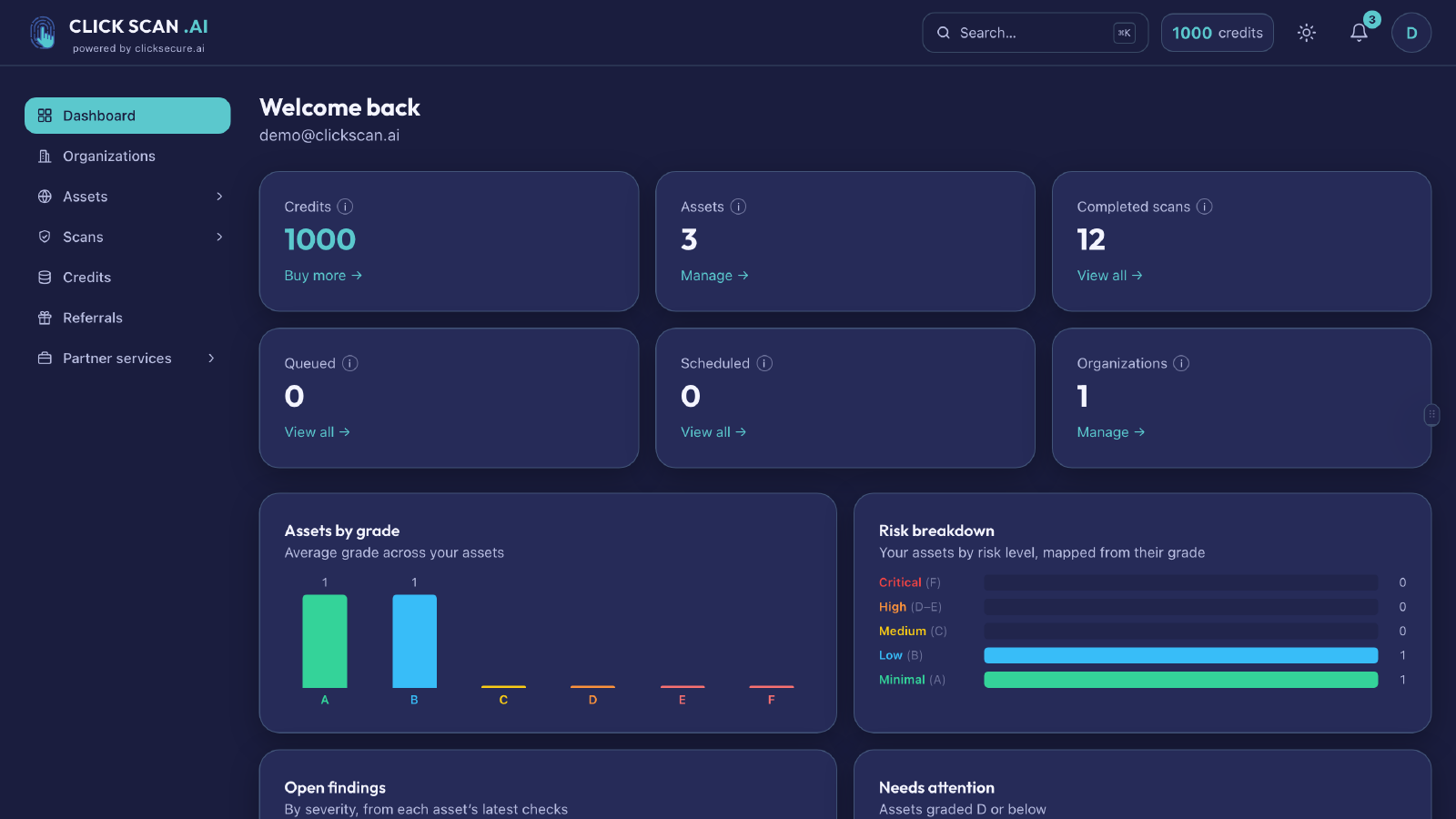
Update, 27 August 2026 — ClickScan.AI is live and open to everyone. This was first published in July as a preview of something we were still building. Everything below is the product running in production today: no invitation, no waiting list, and public sign-up open to anyone.
Most people who own something on the internet are not security specialists. They run a shop, a practice, an agency, a small SaaS. They have a website, a mail domain and a couple of servers — and no realistic way to answer a simple question: is any of this configured badly enough to hurt me?
The usual answers are bad. Hire a consultant, and you get an excellent report once a year for money that does not fit a small budget. Run a free scanner, and you get a wall of CVSS scores, protocol names and severity codes that tell you something is wrong without telling you what to do about it. Do nothing, and you find out the hard way — an expired certificate on a Saturday, a customer forwarding you a phishing email that came convincingly from your own domain.
ClickScan.AI is our answer to that gap, and it is now live.
It checks the things attackers check first — your domains, your mail set-up and your public servers — from the outside, on a schedule you choose, and writes the result the way a colleague would explain it: what you have, how serious it is, and exactly what to do about it. No jargon to decode before you can act, no consultant to book.
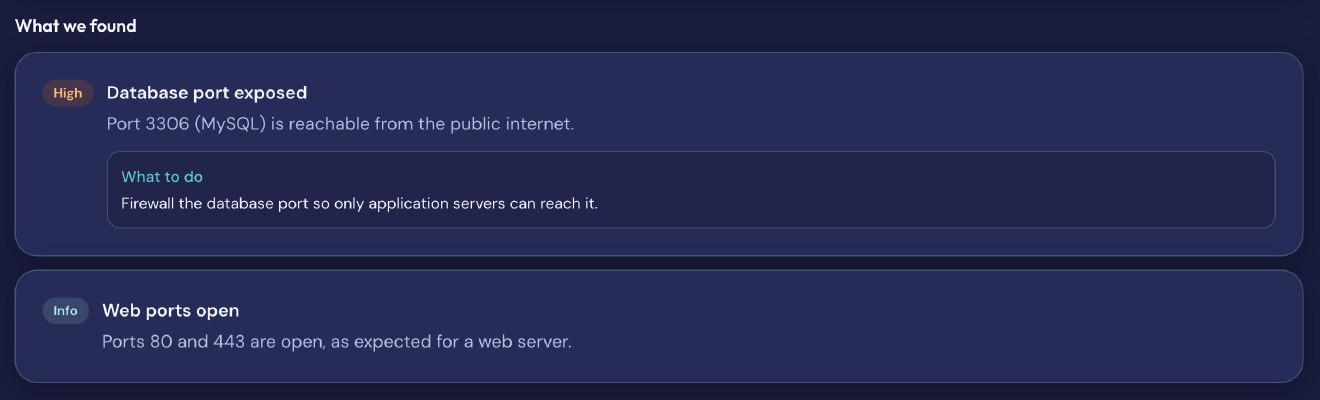
This is what a finding looks like. A severity, one sentence of plain English, and the fix — not a CVSS vector to decode.
Update, 27 August 2026: it is live
This post was first published on 29 July 2026, when ClickScan.AI was still in testing. It has been updated rather than replaced, because what it described is what shipped.
ClickScan.AI is running in production. Every check below works today, on real assets, and the platform is taking payments.
Sign-up is open to everyone. No invitation, no waiting list: create an account with your email address — there is no password and no card — and new accounts get free starter credits, so your first check costs nothing.
Several checks have shipped since this post was first written, and they are described in their own section further down.
The checks
SSL/TLS certificate and encryption. Is your HTTPS valid, trusted and modern? Certificate expiry and trust chain, every protocol version and cipher suite your server actually accepts, and forward secrecy, graded from A+ down to F — with OCSP stapling, Certificate Transparency, CAA and the HSTS header reported alongside, and a long-lived HSTS policy earning the A+. Named weaknesses are actively probed, not guessed: Heartbleed, POODLE, ROBOT, DROWN, Logjam, CRIME, Ticketbleed, CCS injection, insecure renegotiation and the CBC padding-oracle family. If we cannot complete a test, the report says "not tested" rather than quietly passing you.
HTTP security headers. Whether your site sends the response headers that protect your visitors — HSTS, Content-Security-Policy, X-Frame-Options, X-Content-Type-Options, Referrer-Policy, Permissions-Policy — plus the cross-origin isolation headers, anything deprecated, and the headers that quietly advertise which software and version you are running. It reads your site over HTTPS, or over plain HTTP when the address starts with http://, and grades A to F on how many of the six core headers you set — there is no A+, and a site served over plain HTTP is graded D at most.
Email security (SPF, DKIM, DMARC). Can scammers send email as you? We read your domain's mail DNS — MX, SPF, DKIM, DMARC, MTA-STS, TLS-RPT and BIMI. The report carries the raw DNS answers we read, plus, for each thing that is missing, the exact record to paste into your DNS panel — already filled in with your domain, because the most common way this goes wrong is a record published with example.com still in it. DKIM is the exception: you get the correct name and the shape, and your mail provider gives you the key. The same builder is the free DNS record generator on the app's Tools page, which needs no scan first.
Email spoofing test. We actually try to deliver a forged message to your own domain and show you whether it got through. Proof, not theory. It is one fixed, plain-text message that explains itself, and it can only ever be sent to an address at the domain being tested. If your mail server refuses it at the recipient step — a mailbox that does not exist, say, or greylisting, a rate limit or a full mailbox — we report the test as inconclusive and grade it C instead of calling it a pass, because a false all-clear is worse than no test.
Email breach exposure. Which known breaches one of your addresses appears in, and what types of data each one held — passwords, addresses, phone numbers. A mailbox is an asset in its own right here, so it gets the same history, scheduling and reports as a domain. We never receive the breached values themselves, and there is nowhere in our system to put them.
Brand Impersonation Monitor. Which domains somebody has registered to look like yours — and, more usefully, which of them are actually dangerous. Thousands of variations of your name are generated and checked in public DNS, and each registered one is classified: yours, another company's brand protection, parked, serving a website, or able to receive email. The report leads with how many are worth acting on rather than how many exist, and on a paid account the dangerous ones export as STIX or YARA for your own blocklists.
Port Scan. Which ports on a host are reachable from the internet, and what is answering on them. It connects to your infrastructure, so the asset has to be proven yours first.
Shipped since this post was first written
Everything above was in the original July preview. These landed afterwards, and all of them run today.
Brand impersonation — deep sweep. The same lookalike check, much wider: every country ending rather than the common ones, two look-alike substitutions at once, and every single-character typo.
Port Scan — full range. All 65,535 ports rather than the ones services are traditionally assigned to, and web servers and databases that answer are asked what they are running — an ordinary page request, or the status command a database's own monitoring uses — rather than waiting for them to volunteer it.
Subdomain discovery. The other names attached to your domain — the staging site, the old gateway, the thing a contractor set up and left running — and the ones still pointing at a cloud service nobody pays for any more, which anybody can claim and then serve their own content from your domain, with a valid certificate. It asks your domain's own name servers and reads the public certificate logs. Both versions look one level deeper, under the names they find, and read the tab icon of up to 40 hosts, turning "this name suggests Jenkins" into "this host is running Jenkins"; the deep sweep asks about more names — about ten thousand rather than two thousand.
Does your firewall actually cover everything? If your domain sits behind a filtering service — the kind that absorbs attacks before they reach you — subdomain discovery works out which of your hosts answer on their own address, around it. That is a way in that skips the protection you are paying for, and it is the finding owners tend to act on the same afternoon. Hosts that could never sit behind such a service are deliberately left out, and if our copy of a provider's published addresses is old, or we do not have one, we say so and make no claim rather than accuse your infrastructure on stale data.
Domain and DNS Security Check. The records that decide who may answer for your domain, and whether they can be changed under you: which of four DNSSEC states the domain is in, and your CAA record. It reads public DNS only, so it needs no proof of ownership.
Web App Scan. Walks a running web application and judges what it sends back. The Crawling & Passive Scan follows links the way a visitor would; the Crawl & Attack version also submits what the crawl found. Both ask you to prove the site is yours, and each comes in three sizes — Small, Medium and Large.
What an attacker already knows. The port checks also report what a public internet-wide index already publishes about your addresses — what somebody learns about you for free, before touching anything of yours.
Two rules about what we report
These are worth stating plainly, because they are the reason a grade from us is worth quoting to somebody else.
Somebody else's data never sets your grade. Part of a report is observed by a third party rather than by us. We show it — it is exactly what an attacker gets for free — and we keep it out of your grade, which reflects only what we tested ourselves. Those observations are never counted among your findings.
When our reference data is out of date, we say so. Subdomain discovery decides whether a host sits behind a filtering service by comparing it against the addresses each provider publishes. If our copy of those lists is old, or we do not have one, it says so and makes no claim rather than guessing.
More checks are on the way. We list one the day it runs, not the day it is planned — if you need something specific, tell us.
Around the checks: the platform
A scanner on its own is a tool. What makes it usable by a non-specialist is everything around it.
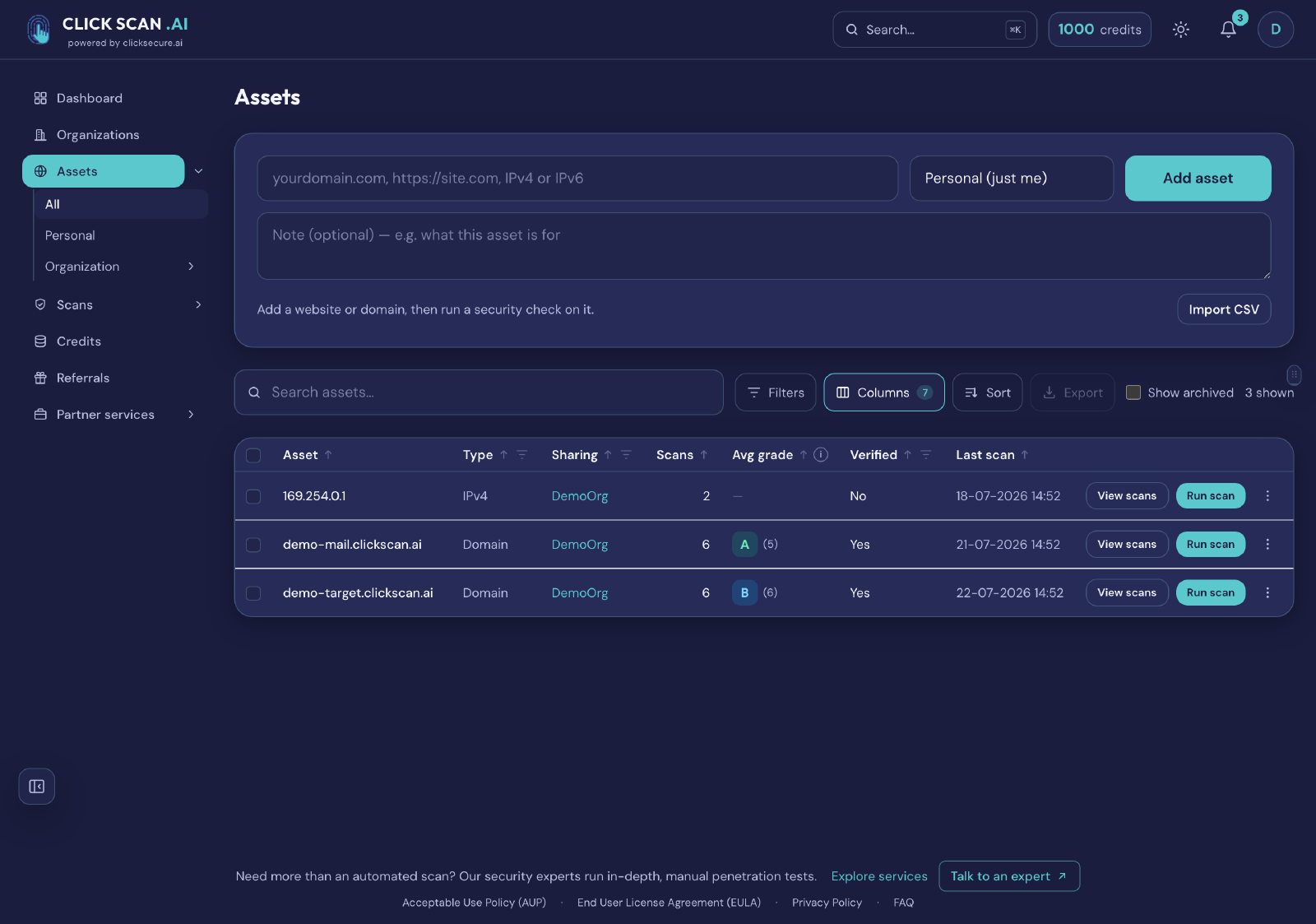
Everything you watch in one list — with the grade it currently holds and when it was last checked. Screens are from a demo account.
- Assets you actually own. Keep an inventory of the domains, IP addresses and mailboxes you watch, imported from a CSV or a DNS zone file, up to 1,000 at a time. For the deeper checks we ask you to prove an asset is yours, in whichever way suits it: a DNS TXT record, a file at
/.well-known/, a code emailed to an address at the domain, a callback from the IP itself, or reverse DNS. - On demand, booked, or recurring. Run a check now, book it for a date, a time and a time zone up to a year ahead, or repeat it daily, weekly or monthly. Recurring runs can be cheaper per run — some checks carry a recurring discount — and if a scheduled run cannot be paid for, it is skipped and nothing is charged: a recurring schedule stays active and you are told the first time it happens, and a one-off booking does not run.
- Your whole estate in one go. Select many assets and many checks at once; the wizard asks only for what each one needs, skips combinations that do not apply, and shows the total cost before you spend a credit.
- Reports people actually read. An A+ to F grade, a line naming the finding that drove that grade, and findings written as "what you have / how bad it is / what to do" — most leading with the standard name of the weakness, such as
Missing Forward Secrecy, and each saying how we know it: confirmed, or inferred from published records or response headers. Underneath sit the cipher tables, raw DNS answers and per-weakness verdicts for whoever wants the evidence. Download a scan report as an executive summary or with technical detail, or an asset report that gathers every check together — downloads are part of a paid plan. - What changed since last time. Each run is compared with the previous run of the same check on the same asset, and a scheduled or recurring scan emails you only when an issue is new, an issue is resolved or the grade moves — one email listing every asset that changed, rather than an identical email every morning.
- "We know, that one is fine." Mark a finding as not applicable on one asset, with a reason on the record. It always expires, it never changes the grade, and it is hidden rather than deleted — so the report you hand a client is still the truth.
- Your brand on the report. Agencies and consultants can put their own logo and colour on the downloadable PDF reports, once they have bought credits and the brand has been reviewed; a small "powered by ClickScan.AI" line stays in the footer.
- Warnings before the problem. For every asset whose latest SSL/TLS check finished in the last 90 days, you are warned 30, 7 and 1 days before the certificate expires and again once it has — in the app each time, and by email at 7 days, at 1 day and on expiry. You are also told when a scheduled scan did not run or was switched off, and a scheduled summary — monthly by default, weekly or off — gives you the counts: coverage, open findings by severity, how grades are spread and how they moved.
- One view of your exposure. A dashboard answering the questions worth asking: which assets need attention, how your grades are spread, how much of what you own has actually been checked, and whether your grades are improving.
What it costs
Pay as you go. You buy credits and spend them on the scans you actually run — no subscription, no per-seat fee, no lock-in. New accounts get free starter credits, some checks carry a recurring discount, and referrals earn credits for both sides. Prices are shown before VAT, which is added at checkout, and every purchase gets an invoice.
Two things we think are only fair: a scan that fails is refunded automatically, and a check that had nothing to test — a spoofing test against a domain that receives no email, say — is graded "not applicable" and refunded rather than sold to you as a good result. Credits you pay for do not expire; free ones last twelve months from the day they are granted and are always spent first.
Who it is for
- Freelancers and solo makers — check your own sites and your clients' without hiring a pentester, and look more professional doing it.
- Startups — ship fast without leaving security behind, on a startup budget and with no security hire.
- SMEs and IT teams — keep an eye on your domains, certificates and email without a dedicated security team, with reports you can put in front of management.
- Agencies and MSPs — monitor every client from one place, one organization per client, and hand each one a clear, branded report they understand.
- Enterprise and security teams — lightweight external monitoring on a schedule, alongside your existing stack.
- Bug bounty hunters and researchers — fast recon on authorized targets, graded and exportable.
What you are allowed to scan
The passive checks — TLS, headers, email records — read public data. The checks that act on the target — the spoofing test, the port scan, the breach lookup and every Web App Scan — need you to prove the asset is yours, and you confirm you are entitled to have it tested as part of that proof. A name or address in a private or reserved range is refused, and scans against one host wait their turn. If our traffic reaches a system of yours and is a problem, write to abuse@clickscan.ai quoting the scan id and we will act on it — and if you would rather it were never scanned, we can add your domains or address ranges to the platform's blocked list.
Getting an account
ClickScan.AI is live and open to everyone. Create an account with your email address, add your first asset, and read a plain-language report a couple of minutes later. Free starter credits, no card, no subscription.
ClickScan.AI is built by ClickSecure AI, whose team has spent 15+ years doing this work by hand. When automation is not enough, the same people run the manual penetration test.