
When a vulnerability in some widely used component is disclosed, the first question is always the same, and it is almost never the interesting one: are we running it?
Most teams lose a day to that question. Someone greps a spreadsheet that was accurate in March. Someone else SSHes into four servers. A third person asks in a channel and gets two confident, contradictory answers. By the time the question is settled, nobody has started on the part that actually matters — whether the affected thing is reachable from outside and what to do about it.
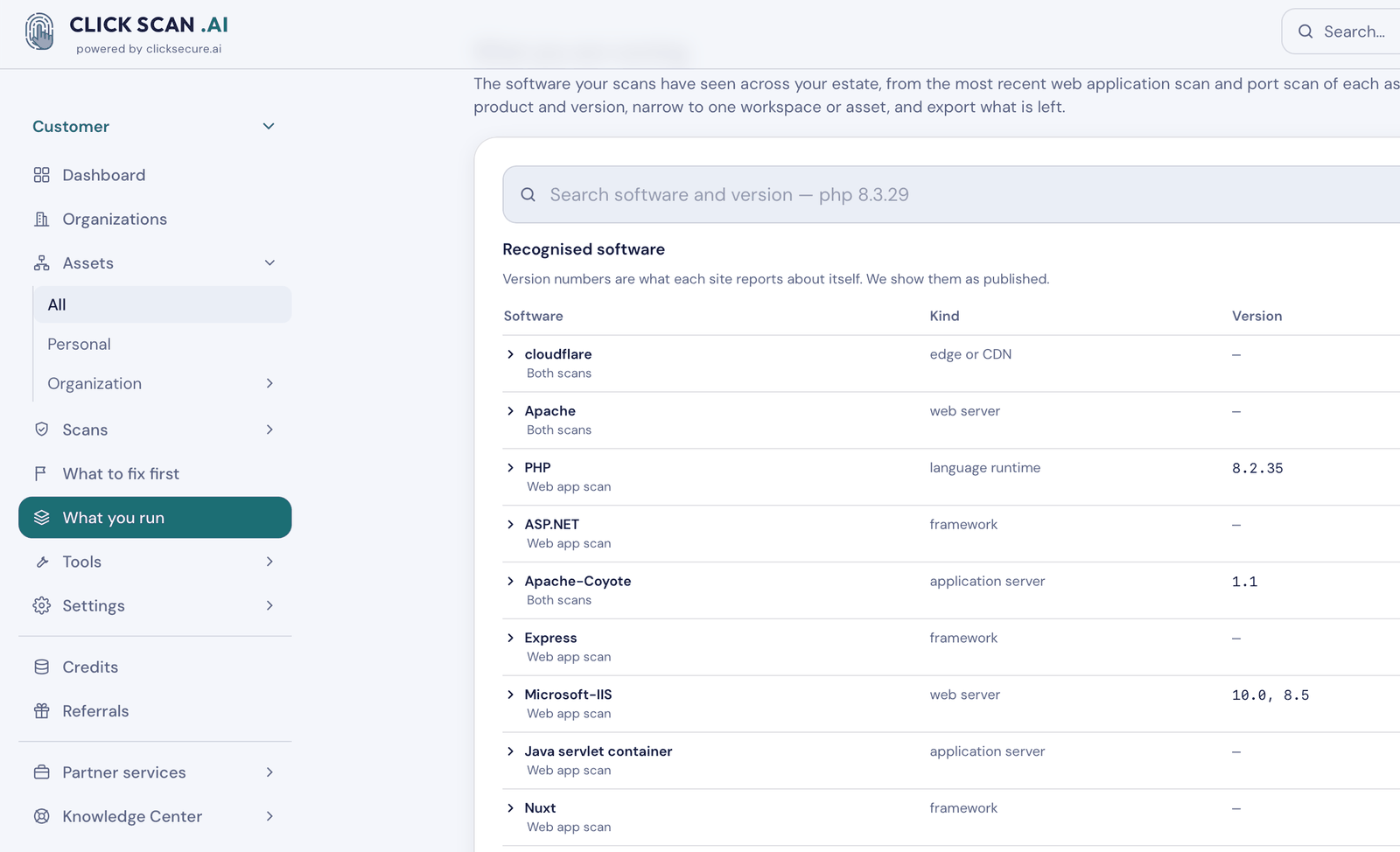
ClickScan now answers it from the data it already has. What you run is a new page in the app that lists the software your scans have seen across your estate, drawn from the most recent web application scan and port scan of each asset.
What it shows
Every piece of software recognised across your assets, with three things attached:
- The product and its kind — web server, language runtime, framework, application server, edge or CDN.
- The version, where the service reports one.
- Which scan saw it — the web application scan, the port scan, or both.
You can search by product and version together (php 8.3.29), narrow the view to one workspace or one asset, and export whatever is left. So the next advisory becomes a search box rather than an investigation: type the product, read the versions, see which assets they sit on, export the list for whoever has to patch.
And if the search turns up something exposed, the next step is already in the same place — point a DAST scan at the asset and find out what it looks like under test, not just what it claims in a header.
The caveat is printed on the page
Worth repeating, because it is the whole reason to trust the feature: version numbers are what each site reports about itself, and ClickScan shows them as published.
This is the same position we have taken in every write-up on this blog where a version number was the crux. Distributions backport security fixes without changing the version string, so a Debian or RHEL package can look vulnerable while already being fixed. Alpine's patched OpenSSH packages kept their old upstream numbers after SSHole. A GitLab instance on a fixed release can still load a vulnerable Ruby inside its own container.
So treat this inventory as what it is: an accurate record of what your estate publishes about itself. That is enough to narrow a fleet of hundreds down to the handful worth looking at, which is the expensive part. It is not enough to close a ticket with "not affected" — that still takes checking the build.
There is a second reading of the same list, and it is the uncomfortable one. Everything on that page was learned from what your servers volunteer to anyone who asks. An attacker scanning your ranges builds the same table, in the same minute, without an account. The only difference is that until now you did not have your copy.
Try it without paying for anything
Some of the tooling at app.clickscan.ai is free to use. Sign-up is passwordless — an email address and a one-time code, no card — and new accounts come with starter credits, so a first scan costs nothing.
If you would rather look before signing in, both of these are open with no account at all:
- What it checks — every check that runs today, grouped by family and filterable by the kind of asset.
- Sample reports — real report output, so you can see the format before you point it at anything of your own.
Passive checks run against what a host already publishes and need no permission. Anything active — the port scan, the DAST scan — is aimed at a specific host, so that asset has to be proven yours first. The scanner is where both start.